



You’ve built a sleek website. You’ve set up your SEO basics. You’ve submitted your sitemap to Google Search Console (GSC) and sat back, waiting for the traffic to roll in.
Job done, right? Wrong.
One of the biggest misconceptions in the digital world is that SEO is a one-time event. Many business owners believe that once Google knows their site exists, the work is over. But as the email notification below proves, submitting your sitemap is not the finish line it’s just the starting gun.
The Wake-Up Call
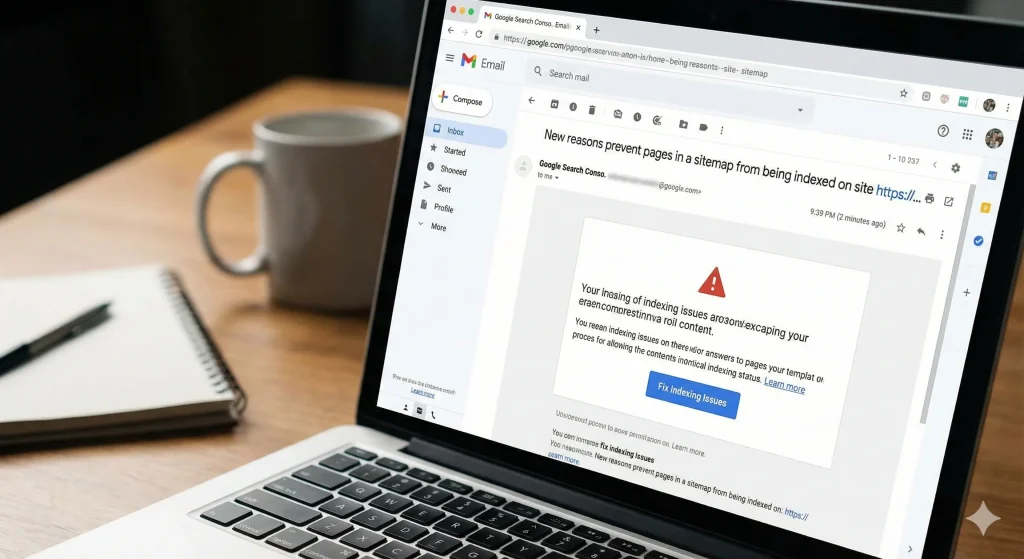
Take a look at this email notification from Google Search Console:
“New reasons prevent pages in a sitemap from being indexed on site…”
This is the nightmare scenario for any business relying on organic traffic. You might have excellent content and great products, but if Google sends you this alert, it means your pages are invisible.
If Google can’t index a page, that page effectively does not exist in search results. It won’t rank, it won’t be clicked, and it certainly won’t convert customers.
Why “Done” Is Never Actually Done
Google’s bots are constantly crawling the web. They don’t just visit your site once; they return periodically to check for updates, changes in structure, and server stability. During these visits, they often encounter roadblocks that weren’t there before.
Here is why you cannot afford to ignore your Search Console after the initial setup:
1. The Web Is Fluid
Websites break. Plugins update and cause conflicts. Hosting servers have hiccups. A page that was perfect last month might throw a 500 Server Error or a 404 Not Found error today. If you aren’t monitoring GSC, you won’t know your money-making landing page is down until a customer complains.
2. “Excluded” Means Invisible
The alert in the image specifically mentions pages being prevented from indexing. This could happen for several reasons:
- Noindex tags: You accidentally told Google to ignore a page.
- Redirect errors: The bot got stuck in a loop trying to find the page.
- Crawl anomalies: Google tried to look but failed due to technical friction.
Every day these errors persist is a day you are handing traffic to your competitors.
3. Ranking Decay
Even if your pages remain indexed, technical errors signal to Google that your site is poorly maintained. Google prioritizes user experience. If their bots struggle to crawl your site, they assume human users will struggle too. The result? Your rankings quietly slip lower and lower.
The Continuous Process: A Strategy for Businesses
To protect your rankings and ensure your sitemap is actually doing its job, you need to shift your mindset from “Setup” to “Maintenance.”
Here is what a healthy GSC routine looks like:
- Weekly Health Checks: Log in to Google Search Console once a week. You don’t need to do a deep dive, just check the “Indexing” tab. Are the green bars (valid pages) going up and the gray/red bars (errors) staying low?
- Investigate Alerts Immediately: When you receive an email like the one above, treat it with urgency. Click “Fix Indexing Issues,” identify the specific URL, and inspect why Google is rejecting it.
- Validate Fixes: Once you resolve an error (e.g., fixing a broken link), you must tell Google. Clicking the “Validate Fix” button in GSC invites the bots to come back and try again.
- Audit After Updates: Whenever you change your site theme, add a new plugin, or migrate content, check GSC three to four days later. This is usually when new indexing errors pop up.
Submitting your sitemap is like listing your phone number in the directory. Monitoring for console errors is making sure you actually answer the phone when it rings.
Don’t let technical glitches silently kill your SEO efforts. If you haven’t checked your Google Search Console for errors this month, consider this your sign to log in today. Your rankings depend on it.